






UNICORN Binance Depth Cache Cluster (UBDCC)
Why | How it works | Who is this for | Architecture | Features | Local Setup | REST API | Kubernetes | API Credentials | Python Client | Bugs | Contributing | Disclaimer
Stop dealing with broken Binance order books.
Install one package, run one command — and every script, bot, or service on your machine gets reliable, synchronized Binance order book data via REST API. Use it from Python, JavaScript, TypeScript, Node.js, Go, Rust, Java, Kotlin, C#, C++, C, Ruby, PHP, Swift, Scala, R, Julia, MATLAB, Dart, Elixir, Perl, Bash/curl — or any other language with an HTTP client. Any number of clients.
pip install ubdcc
ubdcc start
Tested with 600+ redundant DepthCaches on a single machine. Scales to Kubernetes when you need more.
Part of ‘UNICORN Binance Suite’.
Video walkthrough
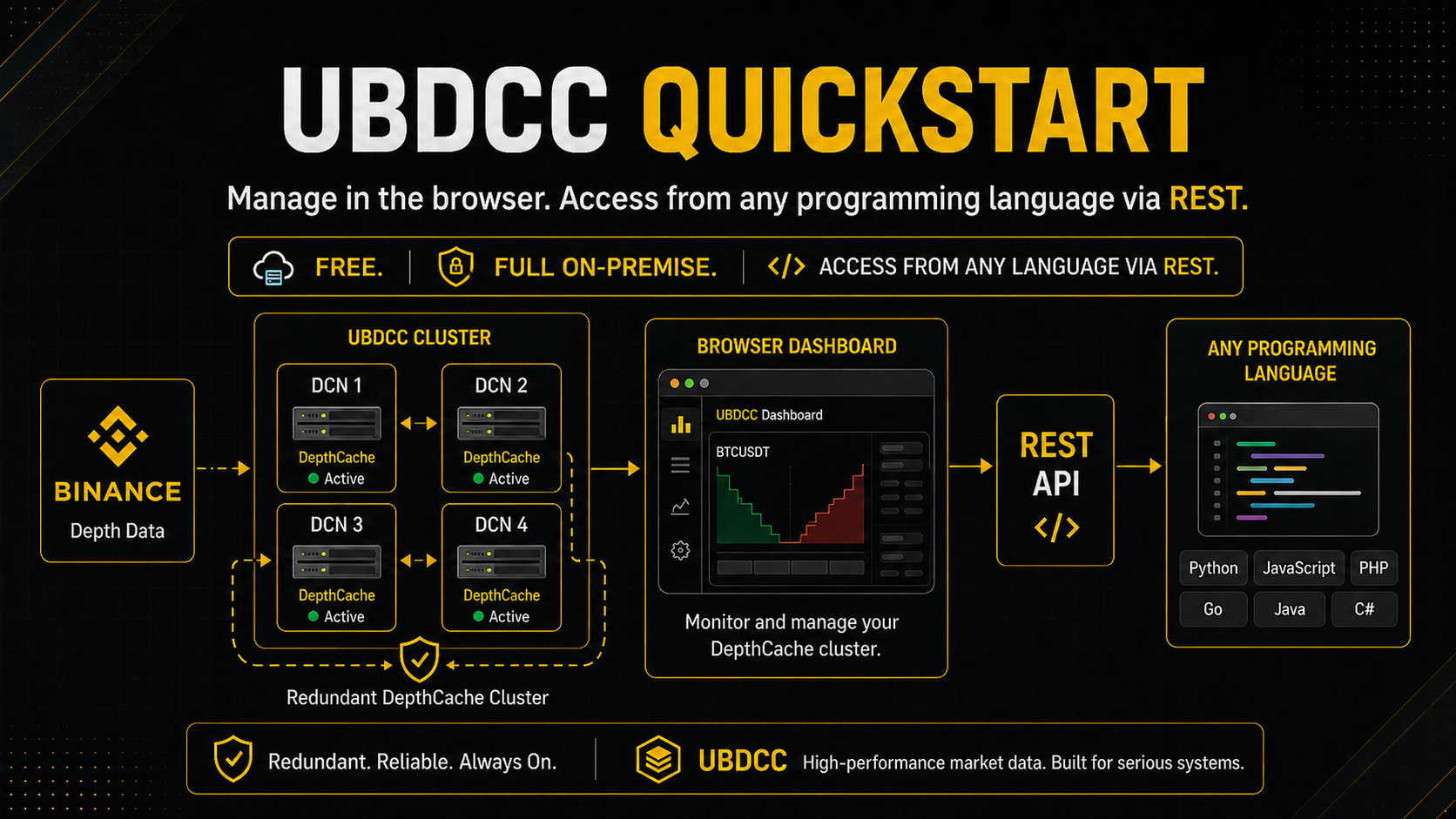
If you prefer to see the full setup once before going through the steps, here is the uncut quickstart video:
Why
If you’ve built trading bots on Binance, you know the pain:
Restart penalty — your script manages 100 DepthCaches. Every restart means minutes of waiting until all order books are re-initialized. During development, you restart constantly.
Duplicated connections — three bots on the same machine, each maintaining their own WebSocket streams and order book copies. Triple the connections, triple the API weight, three slightly different views of the market.
Silent corruption — your order book drifts out of sync and you don’t notice. No error, no exception. You just trade on stale data until you lose money.
Python-only — your depth cache lives inside a Python process. Your monitoring dashboard in Node.js, your execution engine in Go, your analysis tool in Rust — none of them can access it.
UBDCC solves all of this. Your DepthCaches run as a background service, independent of your scripts. They stay alive across restarts, serve consistent data to any language over HTTP, and never silently go stale.
How it works
UBDCC turns Binance DepthCaches into a shared service. Instead of managing WebSocket connections and order book synchronization inside your trading bot, you run UBDCC once and query it over HTTP whenever you need order book data.
What’s handled for you behind the scenes:
Guaranteed consistency — built on UBLDC, which validates every update’s sequence numbers, detects gaps, and triggers automatic resync. It also removes orphaned price levels that Binance stops updating beyond the top 1000 — a gap in Binance’s own specification that causes ghost entries in most other libraries. The cluster either serves correct data or tells you explicitly that it’s re-syncing. It never serves stale data silently.
Redundancy and failover — every DepthCache can run as multiple replicas across different nodes. If one goes down, the next one takes over automatically.
Smart rate limiting — DepthCache initialization is throttled automatically so you never hit Binance’s API limits. Optional per-account API credentials for higher throughput.
Self-healing — cluster state is replicated to every node. If the management process restarts, it recovers from the latest backup automatically. No Redis, no etcd, no external database.
No hard limits — more CPU cores or servers means more capacity. Scales from a laptop to a Kubernetes cluster.
Think of it as Redis for Binance order books — a shared infrastructure layer that any process can query, instead of every bot building its own.
Who is this for
Multi-bot setups — multiple trading bots sharing one consistent order book source instead of each maintaining their own
Arbitrage — compare order books across markets with guaranteed consistency. No divergence between copies.
Market making — reliable spread and liquidity data without silent drift
Rapid development — restart your script 50 times a day without waiting for order books to re-initialize
Polyglot stacks — Python bot, Node.js dashboard, Go execution engine — all reading from the same source via REST
It works in two ways:
On a single machine — run a few processes locally and share DepthCache data between multiple bots or scripts on the same PC. No Kubernetes needed.
On a Kubernetes cluster — scale across multiple servers with redundancy, multiple public IPs for higher Binance API throughput, and automatic state recovery if pods restart.
Architecture
The system consists of three components:
mgmt (1x) — manages the cluster state and distributes DepthCaches across nodes
restapi (1 per node, scalable) — REST API gateway, load-balances data requests to DCN processes
dcn (multiple) — runs the actual DepthCaches via UBLDC
Each DCN runs a single Python process, so one DCN per CPU core gives the best performance (Python’s GIL limits each process to one core).
| Setup | Example configuration |
|---|---|
| Local (8-core PC) | 1 mgmt, 1 restapi, 6 DCN processes |
| Kubernetes (2 servers, 4 cores each) | 1 mgmt, 2 restapi (1/node), 4 DCN pods |
When you create DepthCaches (e.g. 200 markets with desired_quantity=2), UBDCC distributes them evenly across DCN
processes. Each DCN downloads order book snapshots using its own network connection. Replicas are created for
redundancy — if one DCN goes down, the other copy keeps serving data.
        graph LR
    Client["Client\n(any language)"]
    LB["LoadBalancer\n/ Firewall"]

    subgraph cluster ["Kubernetes Cluster / Local PC"]
        R1["RESTAPI"]
        R2["RESTAPI"]
        R3["RESTAPI"]
        Mgmt["Mgmt\n:42080"]
        DB[("DB\n(in-memory,\nsynced to\nall nodes)")]
        DCN1["DCN 1\n:42082"]
        DCN2["DCN 2\n:42083"]
        DCN3["DCN 3\n:42084"]
        DCN4["DCN 4\n:42085"]
    end

    Client -->|"HTTP/JSON\n:42081 / :80"| LB
    LB --> R1 & R2 & R3
    R1 & R2 & R3 -->|"get_asks\nget_bids"| DCN1 & DCN2 & DCN3 & DCN4
    R1 & R2 & R3 -->|"create/stop\ncluster_info"| Mgmt
    Mgmt -->|"distribute\nDepthCaches"| DCN1 & DCN2 & DCN3 & DCN4
    Mgmt --- DB
    DB -.->|"backup/recover"| DCN1 & DCN2 & DCN3 & DCN4
Key Features
Deterministic order book state: built on UBLDC, which follows Binance’s synchronization model strictly — explicit out-of-sync detection, automatic resync, and removal of orphaned levels beyond the guaranteed top 1000. The cluster either serves consistent data or fails loudly; it never silently accumulates stale levels.
Redundancy and automatic failover: every DepthCache can be replicated across multiple DCN nodes (
desired_quantity). The restapi load-balances queries across the replicas and falls back to the next node if one becomes unavailable, with the failure surfaced in the response so monitoring sees it.Self-healing state: the cluster database is replicated to every node on each sync cycle. If the management pod restarts, it automatically recovers the latest state from the node with the most recent backup — no external database (Redis, etcd) required, zero manual intervention.
Any language: retrieve DepthCache data via HTTP/JSON from any programming language. Python users can use the UBLDC cluster module for sync and async access.
Smart rate limiting: automatically throttles DepthCache initialization when Binance API weight costs would otherwise blow the limits, and supports per-account API credentials so DCNs can use authenticated rate limits when more headroom is needed.
Scales with your resources: tested with hundreds of redundant DepthCaches across multiple nodes. Add more servers and DCN pods to scale further — there is no hard limit.
Flexible filtering: trim data at the cluster level — limit to top N Asks/Bids or filter by volume threshold. No need to transfer the full order book when you only need the best prices.
Full transparency: every request can include
debug=trueto get detailed timing breakdowns (cluster execution time, transmission time, total request time), the internal routing URL, and which pods handled the request.Fully async top to bottom: the entire stack is built on asyncio — from the REST API down to the WebSocket connections. DepthCache management runs directly as a plugin inside the UBWA WebSocket event loop, so order book updates are processed with zero overhead. Cluster management, data queries and node communication all run non-blocking, keeping response times consistent even when many clients query simultaneously.
Compiled C-Extensions: the entire cluster runs as Cython-compiled code for maximum performance.
Fast access: order book data in ~3ms (cluster-internal) or ~4ms total request time on local networks. Over the internet typically ~60ms.
Supported exchanges:
| Exchange | Exchange string |
|---|---|
| Binance | binance.com |
| Binance Testnet | binance.com-testnet |
| Binance Cross Margin | binance.com-margin |
| Binance Cross Margin Testnet | binance.com-margin-testnet |
| Binance Isolated Margin | binance.com-isolated_margin |
| Binance Isolated Margin Testnet | binance.com-isolated_margin-testnet |
| Binance USD-M Futures | binance.com-futures |
| Binance USD-M Futures Testnet | binance.com-futures-testnet |
| Binance European Options | binance.com-vanilla-options |
| Binance European Options Testnet | binance.com-vanilla-options-testnet |
| Binance US | binance.us |
| Binance TR | trbinance.com |
If you like the project, please
 it on
GitHub!
it on
GitHub!
Local Setup (without Kubernetes)
Run UBDCC on a single machine — useful for development or when you need multiple bots to share the same DepthCache data without duplicate WebSocket connections.
Install
pip install ubdcc
This installs all components (mgmt, restapi, dcn), the ubdcc cluster manager and the
UBDCC Dashboard (browser UI,
launched via ubdcc-dashboard start).
Start with the cluster manager
ubdcc start --dcn 4
This starts 1 mgmt + 1 restapi + 4 DCN processes and drops you into an interactive console:
UBDCC Cluster Manager v0.9.1
Starting cluster with mgmt port 42080, 4 DCN(s)...
  mgmt started (PID 12345)
  restapi started (PID 12346)
  dcn-1 started (PID 12347)
  dcn-2 started (PID 12348)
  dcn-3 started (PID 12349)
  dcn-4 started (PID 12350)

Waiting for 5 pods to register with mgmt...
Cluster is ready!

ROLE             NAME                 PORT     STATUS     VERSION
----------------------------------------------------------------------
ubdcc-mgmt       ubdcc-mgmt           42080    running    0.9.1
ubdcc-restapi    TDMKiCnT6jZ39N       42081    running    0.9.1
ubdcc-dcn        g3HcyluSZ5qWarm      42082    running    0.9.1 (ubldc 2.11.2)
ubdcc-dcn        gpU3hkiU9Ei          42083    running    0.9.1 (ubldc 2.11.2)
ubdcc-dcn        tDuu9mOXrt445XU      42084    running    0.9.1 (ubldc 2.11.2)
ubdcc-dcn        xg6RZRf1APErfh1      42085    running    0.9.1 (ubldc 2.11.2)

DepthCaches: 0 (0 replicas: 0 running, 0 starting)
Redundancy: 0 fully redundant, 0 degraded, 0 no redundancy
Version: 0.9.1

REST API: http://127.0.0.1:42081/
Cluster info: http://127.0.0.1:42081/get_cluster_info

Type 'help' for available commands, Ctrl+C or 'stop' to shut down.

ubdcc>
Interactive console commands
| Command | Description |
|---|---|
status |
Show all pods with role, name, port, status and version |
add-dcn [count] |
Spawn new DCN process(es) for dynamic scaling |
remove-dcn <count\|name> |
Stop and remove DCN(s) — by count or by name |
restart <name> |
Restart a specific pod (mgmt, restapi or DCN by name) |
stop |
Graceful shutdown of the entire cluster |
help |
Show available commands |
CLI commands (from a separate terminal)
While the cluster is running, you can also manage it from another terminal:
ubdcc status                     # show cluster status
ubdcc stop                       # shut down the cluster
The CLI automatically remembers the mgmt port. If you started with a custom port (ubdcc start --port 42090),
status and stop will use it automatically.
Full CLI reference (all subcommands and flags): ubdcc CLI docs.
Start manually (without cluster manager)
If you prefer to manage processes yourself, start each component in a separate terminal:
# Terminal 1: Management (internal, port 42080)
python -c "import os; from ubdcc_mgmt.Mgmt import Mgmt; Mgmt(cwd=os.getcwd())"

# Terminal 2: REST API (your access point, port 42081)
python -c "import os; from ubdcc_restapi.RestApi import RestApi; RestApi(cwd=os.getcwd())"

# Terminal 3+: DepthCacheNode (start one per CPU core you want to use)
python -c "import os; from ubdcc_dcn.DepthCacheNode import DepthCacheNode; DepthCacheNode(cwd=os.getcwd())"
Ports
| Component | Default port | Purpose |
|---|---|---|
| mgmt | 42080 | Internal cluster management (not for direct use) |
| restapi | 42081 | Your access point — all queries go here |
| dcn | 42082+ | Internal, auto-increments if multiple DCNs run on the same host |
Good to know
Start order does not matter: All components automatically discover each other and reconnect if any process restarts.
DCN ports auto-increment: When you start multiple DCN processes on the same machine, each one automatically finds the next free port (42082, 42083, 42084, …). No manual configuration needed.
DepthCaches need a moment: After creating a DepthCache, it needs a few seconds to download the initial order book snapshot from Binance before it can serve data. The status changes from
startingtorunning.Initialization is sequential: DepthCaches are initialized one by one to stay within Binance API rate limits. This is slower at startup but ensures stable operation. With redundancy (
desired_quantity > 1), the delay is not noticeable in production because at least one copy is always running.
REST API
The REST API (default port 42081 locally, port 80 on Kubernetes) is your single access point to the cluster. On Kubernetes, a LoadBalancer service distributes requests across restapi pods automatically. Locally, you connect directly to one restapi instance — it handles all routing to mgmt and DCN processes internally.
Interactive API docs
When running locally (dev mode), the restapi exposes FastAPI’s built-in interactive documentation:
Swagger UI: http://127.0.0.1:42081/docs
ReDoc: http://127.0.0.1:42081/redoc
OpenAPI schema: http://127.0.0.1:42081/openapi.json
These endpoints are disabled in productive mode (Kubernetes).
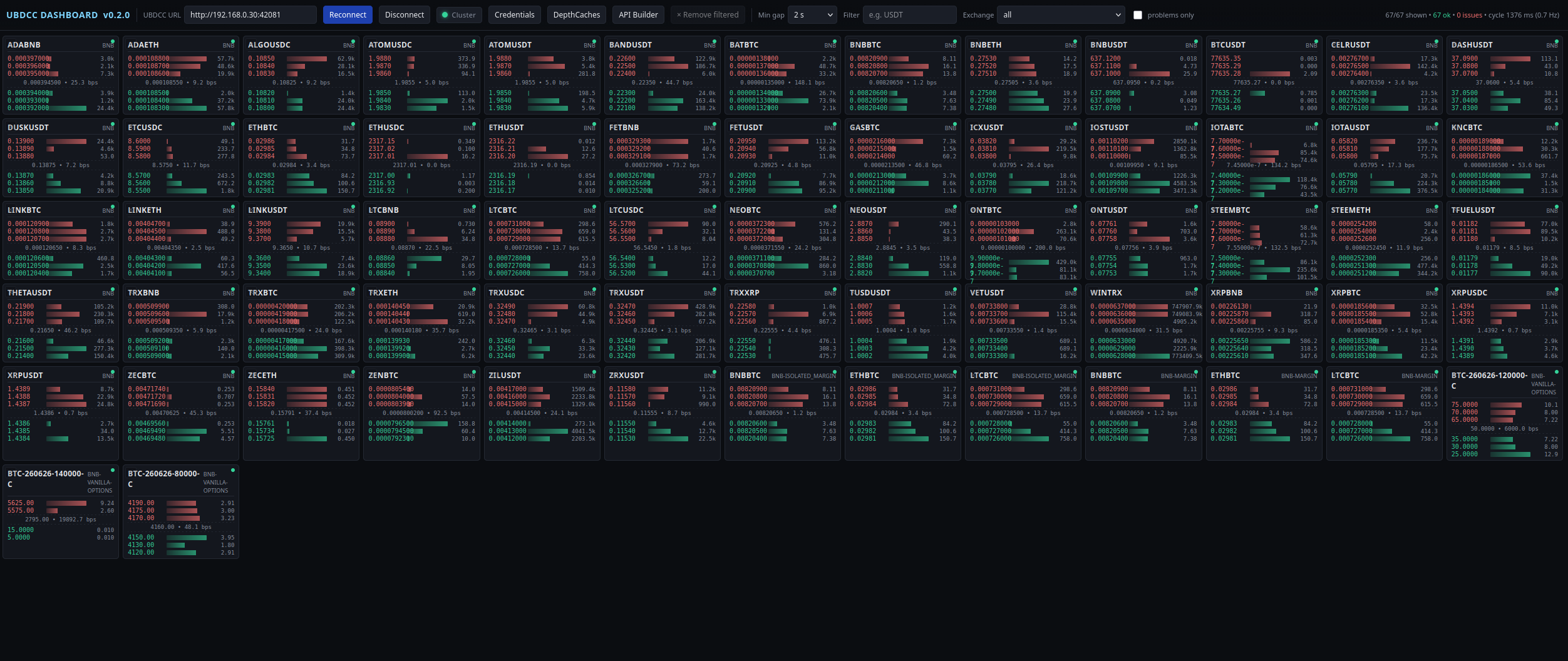
API Builder (dashboard)
For onboarding and day-to-day exploration the
UBDCC Dashboard
ships an API Builder — pick a task (create a DepthCache, query asks/bids,
add credentials, stop a cache, …), fill in a form, and copy a ready-to-paste
REST-API snippet in your language of choice (curl, HTTPie, Python (using the official
UBLDC Cluster client),
JavaScript, Go, C#, Java, Rust, PHP, C/C++).
A Try it → button runs GET-safe calls against the connected cluster and
pretty-prints the response — useful for learning the endpoints without
writing code first.
The dashboard ships as a dependency of ubdcc — pip install ubdcc
already pulls it in. Launch it with:
ubdcc-dashboard start
Public Endpoints (restapi)
These are the endpoints you use to interact with the cluster. All requests go through the restapi.
| Endpoint | Method | Parameters | Description |
|---|---|---|---|
/create_depthcache |
GET | exchange, market, desired_quantity, update_interval, refresh_interval |
Create a single DepthCache |
/create_depthcaches |
POST/GET | exchange, markets, desired_quantity, update_interval, refresh_interval |
Create multiple DepthCaches (POST: JSON body, GET: comma-separated markets) |
/get_asks |
GET | exchange, market, limit_count, threshold_volume |
Get ask side of the order book |
/get_bids |
GET | exchange, market, limit_count, threshold_volume |
Get bid side of the order book |
/get_cluster_info |
GET | — | Cluster overview: registered pods, versions, DB state |
/get_depthcache_list |
GET | — | List all DepthCaches with status and distribution |
/get_depthcache_info |
GET | exchange, market |
Detailed info for a specific DepthCache |
/stop_depthcache |
GET | exchange, market |
Stop and remove a DepthCache |
/add_credentials |
POST/GET | account_group, api_key, api_secret |
Store a Binance API key (see API Credentials) |
/remove_credentials |
POST/GET | id |
Delete a stored API key |
/get_credentials_list |
GET | — | List stored keys (masked) with their assigned DCNs |
All public endpoints accept debug=true as an additional parameter for timing and routing details.
Internal Endpoints (cluster communication)
These endpoints are used by the cluster components to communicate with each other. You don’t call these directly, but understanding them helps when debugging or extending the system.
mgmt (port 42080):
| Endpoint | Method | Description |
|---|---|---|
/ubdcc_node_registration |
GET | DCN/restapi registers itself with mgmt on startup |
/ubdcc_node_cancellation |
GET | DCN/restapi deregisters on shutdown |
/ubdcc_node_sync |
GET | Periodic heartbeat — DCN/restapi reports status, mgmt pushes DB backup back |
/ubdcc_get_responsible_dcn_addresses |
GET | Returns which DCN holds a specific DepthCache (used by restapi for routing) |
/ubdcc_update_depthcache_distribution |
GET | DCN reports DepthCache status changes (starting, running) |
/ubdcc_assign_credentials |
GET | DCN requests an API key for a given account_group — load-balanced across available keys |
mgmt also serves every public endpoint listed above — restapi proxies
write-ops (/create_depthcache, /stop_depthcache, /add_credentials, …)
and metadata reads (/get_cluster_info, /get_depthcache_list, …) to mgmt
since mgmt owns the authoritative DB.
All pods (shared base):
| Endpoint | Method | Description |
|---|---|---|
/test |
GET | Health check — returns pod info, version, status |
/ubdcc_mgmt_backup |
GET/POST | GET: return stored DB backup; POST: receive DB backup from mgmt |
DCN (port 42082+) — serves /get_asks and /get_bids directly.
restapi looks up the responsible DCN for a given (exchange, market) via
/ubdcc_get_responsible_dcn_addresses on mgmt, then routes the read to the
DCN that actually holds that cache. You call restapi, not the DCN.
Examples
Create DepthCaches
# Create multiple DepthCaches (POST with JSON body)
curl -X POST 'http://127.0.0.1:42081/create_depthcaches' \
  -H 'Content-Type: application/json' \
  -d '{"exchange": "binance.com", "markets": ["BTCUSDT", "ETHUSDT", "BNBUSDT"], "desired_quantity": 2}'

# Create a single DepthCache (GET)
curl 'http://127.0.0.1:42081/create_depthcache?exchange=binance.com&market=BTCUSDT&desired_quantity=2'

# Create multiple via GET (useful for browser testing, comma-separated markets)
curl 'http://127.0.0.1:42081/create_depthcaches?exchange=binance.com&markets=BTCUSDT,ETHUSDT&desired_quantity=1'
Query order book data
# Get top 3 asks
curl 'http://127.0.0.1:42081/get_asks?exchange=binance.com&market=BTCUSDT&limit_count=3'

# Get bids filtered by volume threshold
curl 'http://127.0.0.1:42081/get_bids?exchange=binance.com&market=ETHUSDT&threshold_volume=100000'
Manage and monitor
# List all DepthCaches and their status
curl 'http://127.0.0.1:42081/get_depthcache_list'

# Get detailed info for a specific DepthCache
curl 'http://127.0.0.1:42081/get_depthcache_info?exchange=binance.com&market=BTCUSDT'

# Cluster overview (registered pods, versions, timestamps)
curl 'http://127.0.0.1:42081/get_cluster_info'

# Stop a DepthCache
curl 'http://127.0.0.1:42081/stop_depthcache?exchange=binance.com&market=BTCUSDT'
Debugging
Add debug=true to any request to get timing and routing details:
curl 'http://127.0.0.1:42081/get_asks?exchange=binance.com&market=BTCUSDT&limit_count=2&debug=true'
The response includes a debug block with:
cluster_execution_time— time spent processing the request inside the clustertransmission_time— network overhead between restapi and DCNrequest_time— total round-trip time (filled by the UBLDC Python client)url— the internal URL that was routed topost_body— the POST body (for POST requests)used_pods— which pods handled this request
Kubernetes Setup
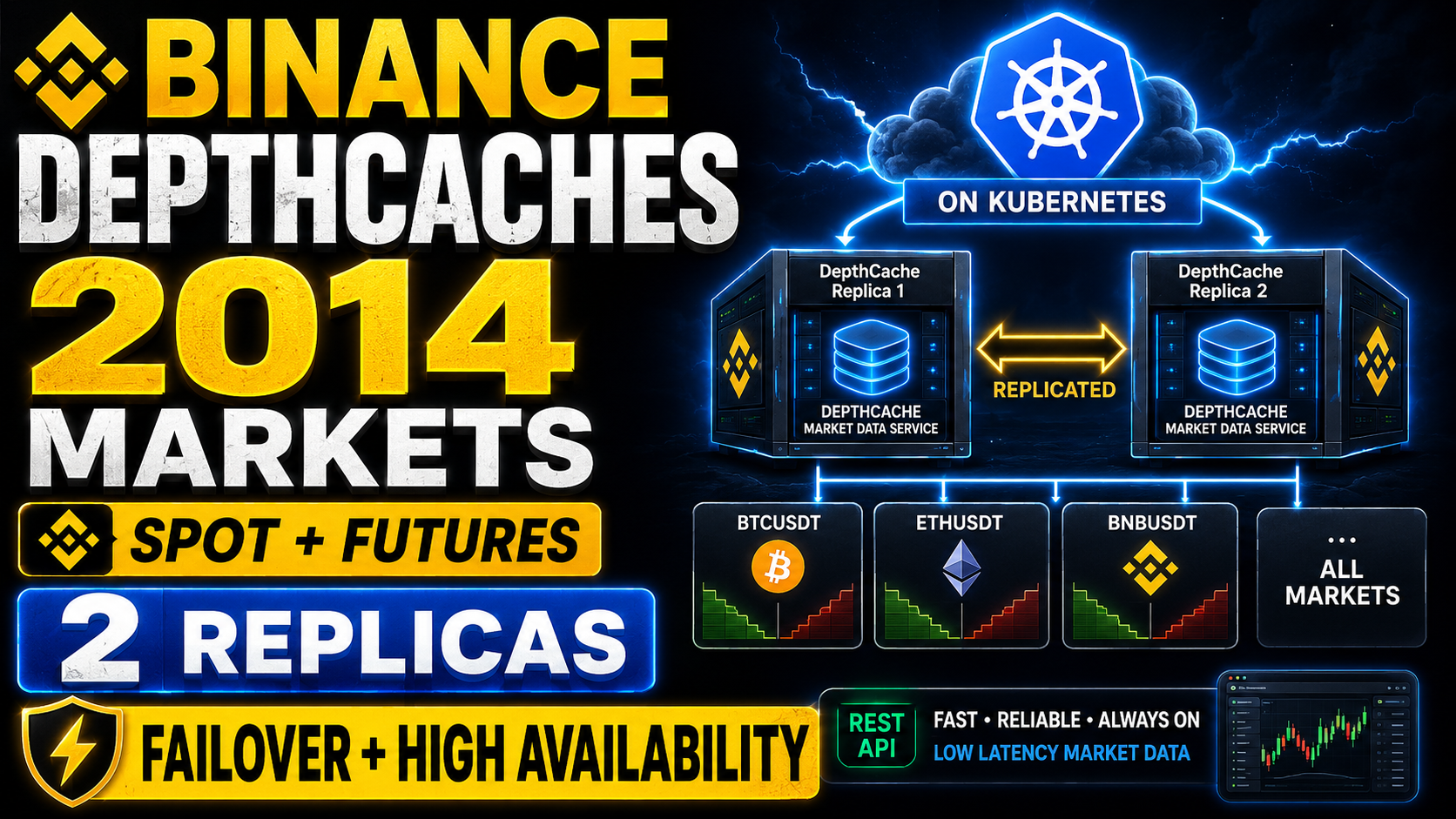
Get a Kubernetes cluster with powerful CPUs from a provider of your choice and connect kubectl.
Successfully tested with:
Helm Chart
Install dependencies
kubectl apply -f https://github.com/kubernetes-sigs/metrics-server/releases/latest/download/components.yaml
Prepare
helm
helm repo add ubdcc https://oliver-zehentleitner.github.io/unicorn-binance-depth-cache-cluster/helm
helm repo update
Install the UNICORN Binance DepthCache Cluster
helm install ubdcc ubdcc/ubdcc
Get the “LoadBalancer Ingress” IP, the default Port is TCP 80!
kubectl describe services ubdcc-restapi
Choose an explicit version
Find a version to choose
helm search repo ubdcc
Then
helm install ubdcc ubdcc/ubdcc --version 0.9.1
Choose a namespace
helm install ubdcc ubdcc/ubdcc --namespace ubdcc
Choose an alternate public port
helm install ubdcc ubdcc/ubdcc --set publicPort.restapi=8080
Scale RESTAPI per node
By default the chart deploys the RESTAPI as a DaemonSet — exactly one RESTAPI pod per node.
This auto-scales as you add or remove nodes and needs no extra permissions; the cluster Service
load-balances incoming requests across all RESTAPI pods.
To run more than one RESTAPI pod per node (e.g. to absorb heavier client load on a small cluster), set:
helm install ubdcc ubdcc/ubdcc --set restapi.perNode=2
With perNode > 1 the RESTAPI becomes a Deployment whose pods are spread evenly across nodes
(topologySpreadConstraints, maxSkew: 1). The node count is auto-detected from the cluster at
install time (only schedulable, non control-plane nodes), so
replicas = perNode × nodeCount. Auto-detection needs permission to list nodes for whoever runs
helm install; on helm template/--dry-run it falls back to a single node.
Override any level explicitly:
# fix the node count instead of auto-detecting
helm install ubdcc ubdcc/ubdcc --set restapi.perNode=2 --set restapi.nodeCount=3   # -> 6 RESTAPI pods

# set the total replica count directly (bypasses the calculation)
helm install ubdcc ubdcc/ubdcc --set restapi.replicas=6

# pin RESTAPI to a dedicated node pool
helm install ubdcc ubdcc/ubdcc --set restapi.nodeSelector.role=edge
Scale DCN per CPU core
By default the chart deploys the DCN as a DaemonSet — exactly one DCN pod per node. This
auto-scales as you add or remove nodes and needs no extra permissions.
Each DCN is a single Python process (GIL-bound), so one DCN per CPU core is the optimal distribution. To run more than one DCN per node, tell the chart how many cores your DCN nodes have:
helm install ubdcc ubdcc/ubdcc --set dcn.coresPerNode=4
With coresPerNode > 1 the DCN becomes a Deployment whose pods are spread evenly across nodes
(topologySpreadConstraints, maxSkew: 1). The node count is auto-detected from the cluster at
install time (only schedulable, non control-plane nodes are counted), so
replicas = coresPerNode × nodeCount. Auto-detection needs permission to list nodes for whoever
runs helm install; on helm template/--dry-run it falls back to a single node.
Override any level explicitly:
# fix the node count instead of auto-detecting
helm install ubdcc ubdcc/ubdcc --set dcn.coresPerNode=4 --set dcn.nodeCount=3   # -> 12 DCN pods

# set the total replica count directly (bypasses the calculation)
helm install ubdcc ubdcc/ubdcc --set dcn.replicas=12

# pin DCN to a dedicated node pool
helm install ubdcc ubdcc/ubdcc --set dcn.coresPerNode=4 --set dcn.nodeSelector.role=dcn
For real per-core CPU pinning, give each pod a full core with Guaranteed QoS (requests == limits,
integer cpu) — this requires the kubelet cpuManagerPolicy: static on your nodes:
helm install ubdcc ubdcc/ubdcc --set dcn.coresPerNode=4 \
  --set dcn.resources.requests.cpu=1 --set dcn.resources.limits.cpu=1
Operational notes (Deployment mode, coresPerNode > 1):
Node-list permission. Auto-detection lists cluster nodes at install time, so whoever runs
helm install/upgradeneeds the cluster-scoped right tolist nodes. If it’s missing, the lookup returns empty and the chart silently falls back to a single node (you get onlycoresPerNodepods total instead ofcoresPerNode × nodes). When in doubt, set the count explicitly:--set dcn.nodeCount=<n>.Which nodes are counted. Only schedulable worker nodes — nodes that are
unschedulableor carry thenode-role.kubernetes.io/control-plane(or…/master) label are skipped, since DCN pods won’t land on a tainted control-plane anyway. If the pod count looks off, checkkubectl get nodes --show-labels.Adding nodes later. A
Deploymenthas a fixed replica count — new nodes do not automatically get DCN pods. Re-runhelm upgrade(re-detects the node count) or bumpdcn.nodeCount/dcn.replicas. The defaultDaemonSetmode (coresPerNode: 1) does adapt automatically.Switching modes on upgrade. Crossing the
coresPerNode1 ↔ >1boundary changes the resource kind (DaemonSet ↔ Deployment). Helm deletes the old object and creates the new one, so expect a brief gap in DCN coverage during that one upgrade.
Example — adding a node in Deployment mode. Say you start on 3 nodes with 4 cores each:
helm install ubdcc ubdcc/ubdcc --set dcn.coresPerNode=4 # detects 3 nodes -> 12 DCN pods (4 per node)
Later you add a 4th node. The Deployment still carries replicas: 12, so the new node stays
empty — Kubernetes does not add pods on its own. Re-run the upgrade to re-detect the node count:
helm upgrade ubdcc ubdcc/ubdcc --set dcn.coresPerNode=4 # now detects 4 nodes -> 16 DCN pods (4 per node)
Or skip auto-detection and pin the numbers yourself:
helm upgrade ubdcc ubdcc/ubdcc --set dcn.coresPerNode=4 --set dcn.nodeCount=4   # -> 16 pods
helm upgrade ubdcc ubdcc/ubdcc --set dcn.replicas=16                            # fixed total
In DaemonSet mode (the default, coresPerNode: 1) none of this is needed — a new node gets its
one DCN pod automatically.
Kubernetes Deployment
Apply the deployment files with
kubectl
kubectl apply -f https://github.com/kubernetes-sigs/metrics-server/releases/latest/download/components.yaml
# then wait 10 minutes ...

kubectl apply -f ./setup/01_namespace_ubdcc.yaml
kubectl apply -f ./setup/02_role_ubdcc.yaml
kubectl apply -f ./setup/03_rolebinding_ubdcc.yaml
kubectl apply -f ./ubdcc-mgmt.yaml
kubectl apply -f ./ubdcc-mgmt_service.yaml
kubectl apply -f ./ubdcc-restapi.yaml
kubectl apply -f ./ubdcc-restapi_service.yaml
kubectl apply -f ./ubdcc-dcn.yaml
Get the “LoadBalancer Ingress” IP, the default Port is TCP 80:
kubectl -n ubdcc describe services ubdcc-restapi
API Credentials
UBDCC can run entirely without Binance API keys — DepthCaches are built from public market data streams and endpoints. When you run at larger scale you may want to add API keys to raise the REST rate-limit ceiling (snapshots for initial sync, refresh cycles). Keys are optional.
Account groups
Each Binance account has its own keys. UBDCC groups related exchanges under one account_group:
| account_group | Covers UBLDC exchanges |
|---|---|
binance.com |
binance.com, binance.com-futures, binance.com-margin, binance.com-isolated_margin, binance.com-vanilla-options |
binance.com-testnet |
binance.com-testnet, binance.com-margin-testnet, binance.com-isolated_margin-testnet (Spot testnet — separate login on testnet.binance.vision; margin testnet shares the same account) |
binance.com-futures-testnet |
binance.com-futures-testnet, binance.com-vanilla-options-testnet (shared Futures/Options testnet) |
binance.us |
binance.us |
binance.tr |
trbinance.com |
Add / remove / list
# Add a key
ubdcc credentials add --account-group binance.com --api-key <KEY> --api-secret <SECRET>

# List (masked)
ubdcc credentials list

# Remove
ubdcc credentials remove <id>
Or over HTTP:
curl -X POST 'http://127.0.0.1:42081/add_credentials' \
  -H 'Content-Type: application/json' \
  -d '{"account_group":"binance.com","api_key":"...","api_secret":"..."}'
You can register multiple key pairs per account group. Mgmt assigns each DCN one key from the
pool (load-balanced: the key with the fewest assigned DCNs wins). Restart the DCN to pick up a new
assignment. get_cluster_info / credentials list show which DCNs each key is assigned to.
Security caveats
Keys are stored in the cluster DB (the same DB that is replicated to every pod for self-healing). Inside the cluster they are full, cleartext — this is a deliberate trade-off so that the self-healing/backup flow keeps working.
Public responses (
get_cluster_info,get_credentials_list) only return masked previews of the key and never the secret. The internal endpoints are a different story:/ubdcc_assign_credentialsreturns the full pair to a requesting DCN, and/ubdcc_mgmt_backup— served by every pod, the public restapi included — returns the whole cluster DB including the secrets, because that is how the backup reaches every pod. None of these endpoints is authenticated.It is your responsibility to protect the cluster: lock down the network (firewall, private VPC), restrict who can talk to mgmt/restapi, keep node images/backups safe. UBDCC does not yet provide transport encryption or authentication on the internal API — we are building from the core outward.
If you don’t want to take on that risk, run UBDCC without credentials — everything still works, just with Binance’s public rate limits.
Give each Binance API key the minimum permissions it needs. For DepthCache use, read-only is sufficient. IP-whitelist the key on Binance if you can.
Security
In any case, you should set the firewall in the web interface of the Kubernetes provider so that only your systems have access to UBDCC.
If you want to do this, you can add HTTPS to the LoadBalancer with most providers.
Uninstallation
kubectl delete -f https://github.com/kubernetes-sigs/metrics-server/releases/latest/download/components.yaml
Helm Chart
helm uninstall ubdcc
Kubernetes Deployment
Delete the deployment with
kubectl
kubectl delete -f ./ubdcc-dcn.yaml
kubectl delete -f ./ubdcc-restapi.yaml
kubectl delete -f ./ubdcc-restapi_service.yaml
kubectl delete -f ./ubdcc-mgmt.yaml
kubectl delete -f ./ubdcc-mgmt_service.yaml
kubectl delete -f ./setup/03_rolebinding_ubdcc.yaml
kubectl delete -f ./setup/02_role_ubdcc.yaml
kubectl delete -f ./setup/01_namespace_ubdcc.yaml
Accessing from Python
While the REST API can be used from any language, Python users can use the
UBLDC cluster module
for a native experience with sync and async support, automatic connection handling, and debug=True output.
See the examples.
Monitoring with the UBDCC Dashboard
For a browser-based live view of every depth cache in the cluster — compact mini-orderbook tiles, desync and error highlighting, add and remove caches on the fly — use the UBDCC Dashboard:
pip install ubdcc-dashboard
ubdcc-dashboard start
Binds to 127.0.0.1:8080 by default and opens the UI in your browser; enter the REST API URL of your cluster
(typical: http://<cluster-host>:42081) and click Connect. See the
dashboard README for CLI flags and network exposure.
Documentation
How to report Bugs or suggest Improvements?
List of planned features - click  if you need one of them or suggest a new feature!
Before you report a bug, try the latest release. If the issue still exists, provide the error trace, OS and Python version and explain how to reproduce the error. A demo script is appreciated.
If you don’t find an issue related to your topic, please open a new issue!
Contributing
UNICORN Binance DepthCache Cluster is an open source project which welcomes contributions which can be anything from simple documentation fixes and reporting dead links to new features. To contribute follow this guide.
Contributors
We  open source!
AI Integration
This project provides a llms.txt file for AI tools (ChatGPT, Claude, Copilot, etc.) with structured
usage instructions, code examples and module routing.
The reasoning behind the code — decisions, rejected alternatives, workarounds and constraints — is kept in context/, maintained with Keep the Why. Coding agents read context/index.md to learn why the project is built the way it is before they change it. The same knowledge is part of the docs as Why this project is built this way, and the Keep the Why Dashboard shows it with its Git history.
Disclaimer
This project is for informational purposes only. You should not construe this information or any other material as legal, tax, investment, financial or other advice. Nothing contained herein constitutes a solicitation, recommendation, endorsement or offer by us or any third party provider to buy or sell any securities or other financial instruments in this or any other jurisdiction in which such solicitation or offer would be unlawful under the securities laws of such jurisdiction.
If you intend to use real money, use it at your own risk!
Under no circumstances will we be responsible or liable for any claims, damages, losses, expenses, costs or liabilities of any kind, including but not limited to direct or indirect damages for loss of profits.

Social
Discussions
Telegram
Reddit Community
https://dev.binance.vision